The Real Cost of Free Tax Filing
Free tax filing offers can hide unexpected fees and data-sharing risks. Learn how IRS Free File, VITA, and TCE can help you file taxes for free while protecting your personal and financial information.

What you’ll need
Tap to tick things off before you start.
Why Free Tax Filing Can Cost You
Free tax filing sounds simple, but the advertised price does not always cover every step required to complete a return. Some commercial services offer free preparation only for specific tax situations, leaving other taxpayers facing charges before they can submit. These costs can strain a household budget, especially when they appear unexpectedly. Understanding the difference between a promotional offer and a genuinely free filing option helps consumers make informed choices before sharing sensitive financial information.

How Commercial Free Offers Work
Commercial tax preparation companies often use free offers to attract customers who want a convenient way to file. However, eligibility may depend on the types of income, deductions, credits or forms included in a return. A service might cover a straightforward federal return but charge for state filing or additional features. The word free alone does not establish what is included. Reviewing the provider's eligibility rules and service limitations before creating an account can help prevent unexpected expenses later.

The Sunk-Cost Trap
The sunk-cost effect describes the tendency to continue with a decision because time, effort or money has already been invested. During tax preparation, someone may enter employment records, income figures and personal details before discovering that filing requires an upgrade. Starting over elsewhere can feel frustrating, making payment seem easier than changing providers. Recognizing this pressure matters because time already spent is not a reason to accept an unexpected charge. Comparing alternatives remains worthwhile, even after entering substantial information.

Check Fees Before You Begin
Before entering personal information, identify exactly what a tax software plan includes. Check whether federal preparation and electronic filing are free, whether state returns cost extra, and whether your income sources or tax forms qualify. Freelance income, investment transactions or certain deductions may affect which products can handle a return without a fee. Review the final price and optional add-ons before proceeding. If the terms are unclear, consult the provider's published conditions or compare another filing option before uploading sensitive records.

How IRS Free File Works
IRS Free File is a federal program that connects eligible taxpayers with participating private tax software providers. Through the official IRS website, users can find guided software options that prepare and electronically file qualifying federal returns at no cost. The IRS does not create every partner's software; participating companies provide the preparation tools under program requirements. Starting at IRS.gov helps distinguish official Free File options from commercial advertisements that may use similar language. Program details and available providers can change between tax years.

Verify Your Eligibility
Eligibility for IRS Free File depends on the rules for the relevant tax year and the requirements of each participating provider. Adjusted gross income can determine which guided software offers are available, while providers may also set conditions involving age, state residency or tax circumstances. Do not rely on an income limit quoted for an earlier year. Check the current eligibility details through the official IRS portal, then confirm that the selected provider supports your return before entering personal information or assuming filing will be free.

Understand Free File Protections
Participating IRS Free File providers must follow program requirements designed to protect eligible users from hidden charges and certain sales practices. These protections distinguish official program offers from unrelated commercial products, although taxpayers should still understand what a particular service covers. IRS Free File partners are also subject to restrictions involving certain financial products, including refund anticipation loans. Before choosing any optional financial service outside the program, review its terms and costs carefully so convenience does not lead to avoidable charges or reduced refund proceeds.

Protect Your Tax Information
A tax return contains highly sensitive information, including Social Security numbers, income records, addresses and bank account details. Before using a preparation service, review its privacy notice and understand whether information may be used for purposes beyond preparing your return. The Federal Trade Commission has warned tax preparation companies about disclosing confidential consumer information without appropriate consent. Avoid approving unfamiliar permissions automatically, use strong account security and share only the information necessary for legitimate filing. Privacy choices deserve the same attention as price.

Know Your Free Filing Alternatives
IRS Free File is not the only route to free tax assistance. Free File Fillable Forms provides electronic versions of federal tax forms for people comfortable preparing returns independently, but it offers less guided support. The Volunteer Income Tax Assistance program, known as VITA, helps qualifying taxpayers with basic returns, while Tax Counseling for the Elderly, or TCE, focuses particularly on older adults and retirement-related tax questions. Eligibility and services differ, so use IRS resources to locate current program details and nearby assistance.

Choose Your Filing Method Carefully
The best filing method balances eligibility, total cost, support needs and privacy. Before choosing, confirm that your income and tax forms qualify, compare the complete price of federal and state filing, and review data-sharing permissions. Make sure the service can handle your return accurately rather than selecting an option solely because it advertises a zero-dollar price. After submitting, save the confirmation and a copy of your return. For complicated business income, rental properties, multiple state returns or unfamiliar tax notices, consider seeking qualified professional assistance.

Avoid Refund Advance Traps
A tax refund advance is a financial product that may provide access to money before the IRS issues a refund. Depending on the provider and product, it may involve fees, interest or other conditions that affect the amount received. A large anticipated refund does not automatically make borrowing worthwhile. The IRS Free File program prohibits participating partners from offering certain bank products through the program. Compare the full terms of any separate offer before accepting it.

What Tax Data Reveals
Tax returns contain information that can expose important details about a person's identity, finances and household. Social Security numbers can be used in identity theft, while bank details may expose accounts to fraud if mishandled. Employment records and home addresses add further personal context. Because this information is concentrated in one document, taxpayers should treat tax files as confidential records. Store copies securely, avoid sending them through untrusted channels and provide information only to legitimate tax preparation services.

How the FTC Protects Consumers
The Federal Trade Commission helps enforce consumer protection laws that can apply when tax preparation companies misuse confidential information. The FTC has warned providers about disclosing tax data for purposes unrelated to preparing a return without appropriate consent. These actions highlight that privacy obligations extend beyond a company's own policies. Consumers can review FTC guidance to better understand the risks of unauthorized data use and learn how regulators address potentially deceptive or unfair practices involving sensitive financial information.

Understand Consent for Data Sharing
A tax software privacy notice may explain whether information is used only to prepare a return or also for other purposes, such as advertising or product recommendations. Read these terms before accepting optional permissions. The FTC has emphasized the importance of affirmative express consent for certain uses of confidential consumer information beyond the requested service. Avoid treating preselected boxes or vague explanations as meaningful understanding. If a permission is unclear, pause and seek clarification before deciding whether to agree.

Consequences of Privacy Violations
Tax preparation companies that mishandle confidential consumer information may face regulatory action and civil penalties when applicable legal requirements are violated. The FTC has described potential penalties for certain violations involving unauthorized use or disclosure of protected information. The exact consequences depend on the facts, the law involved and the enforcement process. A quoted maximum penalty should not be interpreted as an automatic fine in every case. The broader lesson is that privacy practices can carry significant legal and financial consequences.

Find Free Help Through VITA
The Volunteer Income Tax Assistance program, known as VITA, offers free tax preparation help to qualifying taxpayers through trained volunteers at community locations. The program generally serves people with income within its current limits, people with disabilities and taxpayers who need language assistance. Services are intended for eligible basic tax situations, and not every return can be handled at every site. Use the official IRS website to locate nearby VITA assistance, confirm current eligibility requirements and check which documents to bring.

Explore TCE for Retirement Tax Questions
The Tax Counseling for the Elderly program, or TCE, provides free tax help with a particular focus on tax questions affecting older adults. Volunteers are trained to assist with retirement-related topics, including pensions and other income that can complicate filing decisions. The program is especially relevant to taxpayers age 60 and older, although services and eligibility should be confirmed with the local provider. Consult IRS resources to find participating sites and learn whether they can address the questions involved in a particular return.

Use Free File Fillable Forms
Free File Fillable Forms are electronic versions of federal tax forms intended for taxpayers who can prepare a return independently. They allow users to enter figures, complete supported forms and electronically file a federal return without guided interview software. This option may suit confident self-preparers, but it offers less step-by-step assistance and may not explain complex tax situations. Review the current IRS instructions and supported features before choosing this method, particularly if your return includes less familiar income sources or deductions.

Choose the Right Filing Option for Your Situation
Free filing options differ in the guidance they provide, their eligibility rules and the types of returns they support. Guided IRS Free File software can walk eligible users through supported questions, while Fillable Forms require more independent tax knowledge. VITA and TCE offer human assistance for eligible situations, with TCE particularly focused on retirement issues. Compare the options against your income sources, filing needs and comfort with tax forms. If your situation is complex, consider whether qualified professional help is appropriate.

Build a Safer Tax Filing Routine
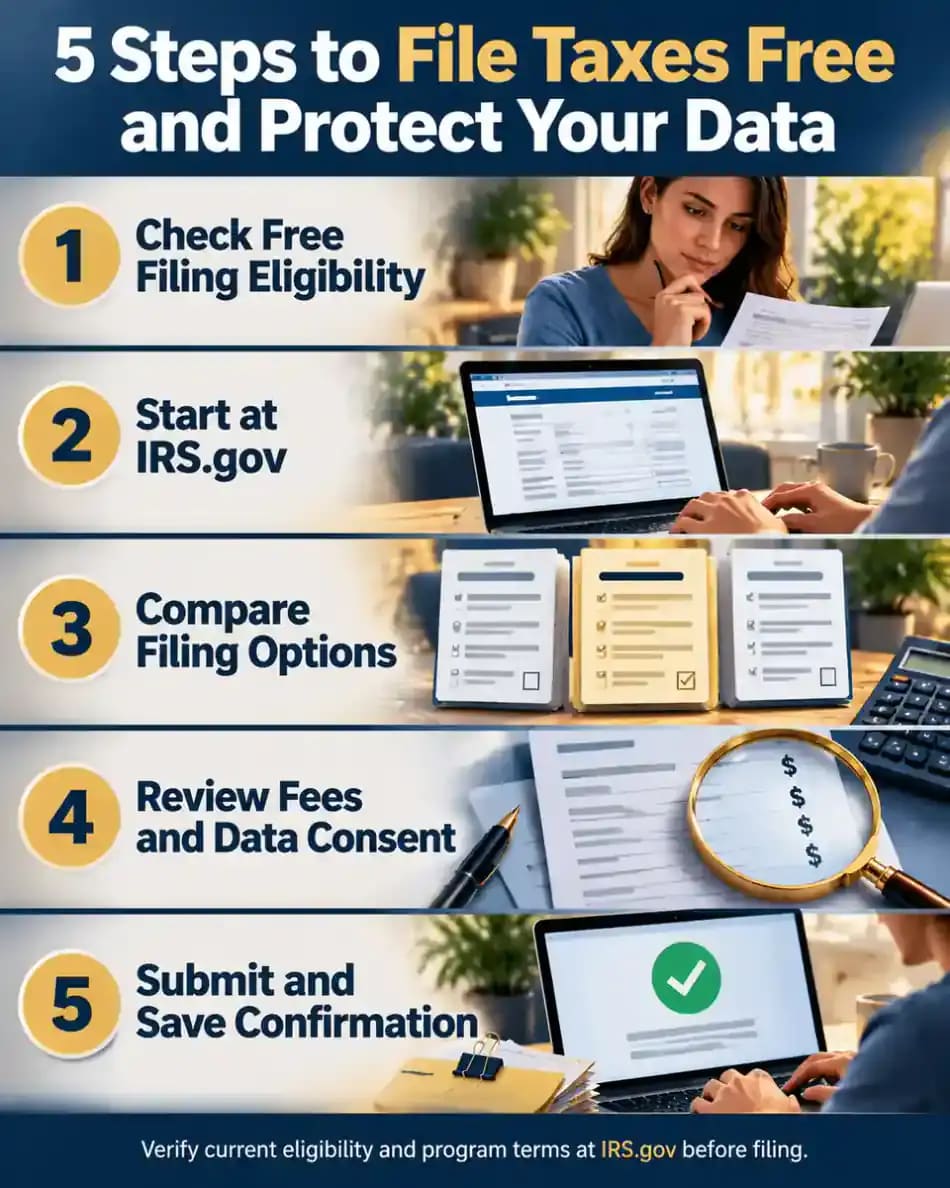
A consistent filing routine can reduce avoidable fees and help protect personal information. Begin with IRS.gov when checking official free filing programs, then verify current eligibility and provider terms before entering sensitive details. Read upgrade prompts and privacy permissions rather than accepting them automatically. Before submitting, review names, income figures, deductions, bank details and other entries for accuracy. After filing, save the submitted return and electronic confirmation in a secure location. These habits support a more informed process without guaranteeing a particular refund or tax outcome.

What Explicit Consent Really Means
Affirmative express consent means making a clear, informed choice to allow certain uses of personal information beyond the service originally requested. The Federal Trade Commission has emphasized that tax preparers should not rely on confusing disclosures or preselected boxes to justify unrelated uses of confidential consumer data. Before accepting optional permissions, identify what information may be shared, who may receive it and why. If the explanation is unclear, pause rather than approving the request automatically.

Financial Penalties for Misusing Tax Data
Improper use or disclosure of confidential tax information can expose tax preparation companies to regulatory enforcement and civil penalties when legal requirements are violated. The FTC has warned providers about the consequences of using consumer information for unrelated purposes without appropriate consent. Penalty amounts depend on the applicable law, circumstances and enforcement action, so a maximum figure should not be treated as an automatic fine. Regulatory penalties also do not automatically mean that individual taxpayers receive compensation.

Why Taxpayer Trust Matters
Taxpayers share sensitive financial details because they expect those details to be handled responsibly and used for legitimate purposes. When providers explain their privacy practices clearly, protect records and honor consent choices, consumers can make better-informed decisions about digital filing. Poor data handling can undermine confidence in tax preparation services and discourage people from using convenient tools. Trust depends on more than security claims: transparent policies, responsible data practices and meaningful choices all contribute to a reliable filing experience.

Compare Free Filing Programs
Free tax filing options differ in eligibility rules, level of guidance and available support. IRS Free File connects eligible taxpayers with participating guided tax software, while Free File Fillable Forms supports independent preparation of federal returns. The Volunteer Income Tax Assistance program and Tax Counseling for the Elderly provide in-person help for eligible taxpayers. Compare each option using current IRS information, paying attention to supported tax situations, filing requirements and whether you prefer guided software or assistance from a trained volunteer.

Match the Program to Your Circumstances
Your circumstances can affect which free filing programs are suitable. IRS Free File offers vary by provider and tax year, while VITA generally serves qualifying taxpayers with income within program limits, people with disabilities and those needing language assistance. TCE focuses particularly on tax questions affecting older adults, especially retirement income. Return complexity also matters because community programs and software may not support every situation. Confirm current requirements and service limits directly with the official IRS or the participating provider.

Prepare and E-File Your Own Return
Independent electronic filing starts with gathering income statements, records of eligible deductions and credits, and any other documents needed for the return. Enter information carefully into supported forms, follow the official instructions and check calculations and identifying details before submitting. Free File Fillable Forms provides a self-directed process rather than the step-by-step interview offered by guided software. After electronic submission, retain the confirmation and verify whether the return was accepted. Submission alone does not guarantee acceptance or establish that every entry is correct.

Know When Self-Preparation Is Not Enough
Self-preparation tools may offer limited help when a return involves complex business income, rental properties, multiple state filings or significant investment transactions. Some situations require tax rules or supporting calculations that basic software does not explain in depth. If you receive a tax notice you do not understand, avoid guessing about its meaning or the appropriate response. A qualified tax professional may help clarify the relevant requirements and available options. Check credentials, service scope and fees before engaging professional assistance.

Get Ready for Community Tax Assistance
Before visiting a VITA or TCE location, check the official IRS locator and contact the site to confirm services, eligibility and appointment availability. Requirements can vary by location, and not every site handles every type of return. Gather relevant income statements, identification, Social Security information and records supporting deductions or credits, following the site's current instructions. Bring any documents specifically requested and ask about language support if needed. Preparing in advance helps volunteers understand your situation and reduces the risk of a wasted visit.

Avoid Pressure During the Filing Process
An unexpected upgrade request does not automatically mean you must pay to file your return. Stop and determine which form or service triggered the prompt, whether the charge is mandatory and whether the software's free tier supports your tax situation. Review the total price before authorizing payment. Treat optional refund-related products and marketing permissions as separate decisions rather than necessary steps. If a provider's terms are unclear, compare official free alternatives before sharing more information or proceeding with a purchase.

Your Free Filing Action Plan
A practical filing plan begins with checking current eligibility through IRS.gov and comparing the available free options. Confirm that your chosen service supports your tax situation, understand any charges and review privacy permissions before entering sensitive details. Complete the return carefully, check identifying information and financial entries, and read the final review screen before submitting. Save a copy of the return and your electronic filing confirmation securely. If the return is rejected or questions remain unresolved, follow the official instructions or seek qualified assistance.

Free tax filing sounds straightforward: enter your information, submit your return, and pay nothing. Unfortunately, some commercial tax preparation services advertise free filing while restricting which forms, income sources, or filing situations qualify. You might spend an hour entering personal information only to discover that claiming a deduction, reporting freelance income, or submitting a state return requires an upgrade.
Before choosing software, compare the complete cost of preparing and filing your federal and state returns. Check whether additional forms, customer support, refund payment options, or other services trigger charges. If a fee appears unexpectedly, you can stop and investigate alternatives rather than paying simply because you have already invested time.
The IRS Free File program provides eligible taxpayers with access to participating providers that offer free guided federal tax preparation and electronic filing. Income limits and provider requirements can change between tax years, so verify current eligibility at IRS.gov. Taxpayers comfortable completing forms independently can also investigate Free File Fillable Forms when available.
If you prefer personal assistance, Volunteer Income Tax Assistance (VITA) and Tax Counseling for the Elderly (TCE) offer free help for qualifying taxpayers. These programs can be especially useful when commercial software feels confusing or expensive.
Privacy deserves equal attention. Tax returns contain Social Security numbers, income records, addresses, and banking information. Review each provider's privacy notice and decline optional data-sharing permissions you do not want to grant. The Federal Trade Commission has warned tax preparation companies about using confidential consumer information for unrelated advertising without appropriate consent.
The goal is simple: choose an appropriate filing method, understand every potential charge, and protect your financial information before submitting your return.
Where people go wrong
Assuming every free filing advertisement means zero cost. Commercial providers may restrict free filing to certain tax situations. Additional forms, state returns, or optional features can require payment. Check the complete pricing conditions before creating an account or entering sensitive financial information.
Ignoring eligibility requirements before starting. IRS Free File providers can have different income limits and eligibility restrictions. Choosing an unsuitable provider may waste time or require switching services. Review the current tax year's requirements and supported forms before beginning your return.
Paying for upgrades because you already invested time. After entering extensive information, abandoning a tax preparation service can feel wasteful. This sunk-cost effect may encourage unnecessary spending. When an unexpected fee appears, identify its cause and compare other available filing methods before paying.
Starting from sponsored advertisements instead of IRS.gov. Search advertisements may promote commercial services using language that resembles official government programs. Starting directly at IRS.gov helps you identify recognized filing options and reduces the risk of confusing a paid commercial offer with an official free program.
Accepting unnecessary refund-related financial products. Refund advances and other optional financial products can carry fees, restrictions, or borrowing costs. They are not equivalent to receiving your refund through ordinary direct deposit. Review the complete terms and compare alternatives before accepting any offer.
Approving optional sharing of sensitive tax information. Tax preparation software collects information that could be valuable for advertising and financial marketing. Review privacy disclosures and consent requests carefully. Decline optional uses unrelated to preparing your return unless you understand and genuinely want those services.
Failing to verify submission and retain records. Completing a tax return does not necessarily mean the IRS has accepted it. Check the electronic filing status, resolve any rejection notices, and save your completed return and acceptance confirmation securely for future reference.
Questions people ask
IRS Free File provides eligible taxpayers with free federal tax preparation and electronic filing through participating providers. The program has eligibility requirements, and state return availability can vary. Begin through IRS.gov and confirm the provider's current conditions before entering your information or selecting additional services.
Fixed it?
Get one guide like this every Thursday.