How to Track a Medical Referral and Schedule Your Specialist Appointment
Waiting for a specialist's office to call? Learn how to confirm referral delivery, check insurance requirements, track paperwork, and follow up until your appointment is scheduled.

What you’ll need
Tap to tick things off before you start.
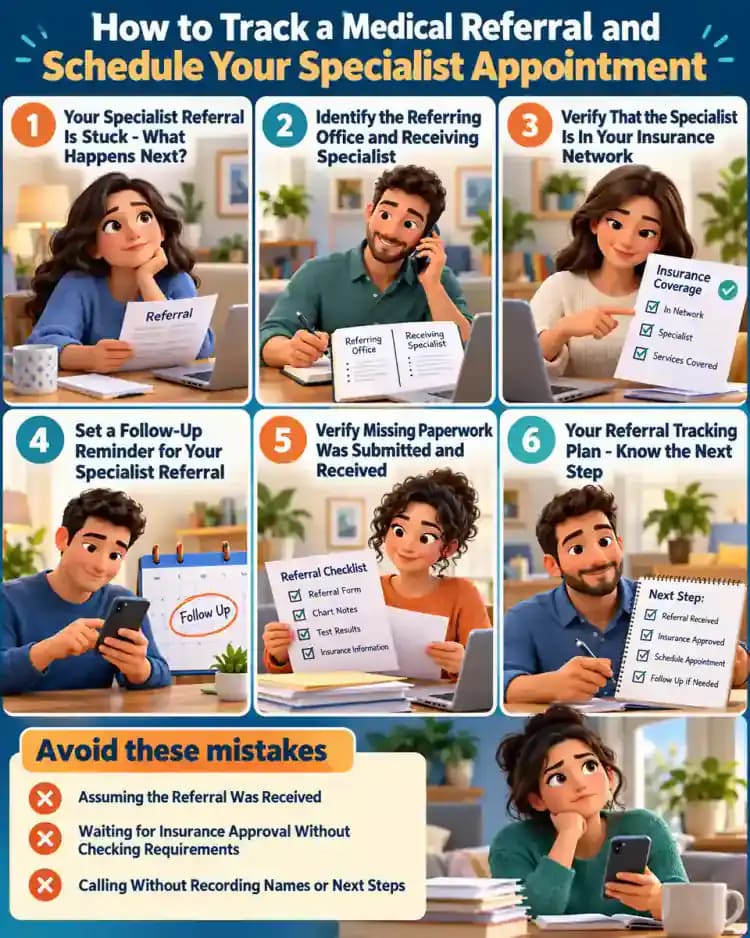
Your Specialist Referral Is Stuck - What Happens Next?
Start by identifying what you know about your referral and what still needs confirmation. If your doctor says it was sent but no one has called, do not assume the specialist received it or that insurance is holding things up. Sending paperwork, receiving it, verifying insurance requirements, and scheduling are separate steps. Write down the referral date and the names of both offices so you can check each step with the right contact.

Understand the Four Steps of a Medical Referral
Track your referral as four separate stages: sent by your doctor's office, received and processed by the specialist, checked for insurance requirements, and scheduled for an appointment. The workflow shown here helps you identify where progress has stopped and which office to contact next. Mark each stage complete only after confirming it directly. Insurance requirements vary, and completing these steps does not guarantee coverage or approval.

Create Your Medical Referral Tracking Checklist
Use a sheet of paper or a secure digital note to create one place for all your referral details. As shown in the checklist, include both office names, the date the referral was sent, confirmation of receipt, insurance requirements, reference numbers, and the person responsible for the next action. Add checkboxes beside each item and circle the next follow-up date so outstanding tasks are easy to spot. Keep personal health information secure.

Gather Your Referral Documents Before Making Calls
Collect the paperwork you will need before contacting either office. As shown in the organizer, keep your referral notice, insurance card, recent patient portal messages, and scheduling instructions together, with a calendar nearby for recording follow-up dates. Check that you have the referral date and verified office contact information. Leave unrelated medical records aside, and store documents containing personal health information securely when you finish.

Protect Your Information and Verify Contact Details
Before making calls or sending documents, compare each office's phone number with its official website, patient portal, or existing referral paperwork. The example shows how to verify contact details and avoid an unfamiliar message requesting medical records. Do not open suspicious links or send sensitive information through unverified channels. Keep your tracking notes in a secure location and share only the information an authorized office needs to handle your referral.

Identify the Referring Office and Receiving Specialist
Check your referral notice or patient portal to identify both offices involved. The referring office is the practice that requested specialist care, while the receiving office is the specialist's practice or scheduling department. As shown in the tracker, enter each office's name, verified phone number, and relevant department contact in separate rows. If responsibility is unclear, ask which office handles the next administrative step before ending your call.

Record the Referral Date and Find Out Who Schedules
Find the referral request date on your referral notice or patient portal, then check the scheduling instructions. Contact the specialist's verified scheduling department to ask whether they will call you or expect you to call first. As shown in the tracker, record the date, contact department, and next action. If documents must be received before scheduling, confirm what is missing and who will follow up.

Confirm When the Referring Office Sent Your Referral
Call the referring office's verified referral department and ask when the paperwork was sent, which specialist's office received it, and how it was transmitted. The call log shown here captures those details while keeping receipt marked as unconfirmed. If the referral has not been sent, ask what information is missing and who must provide it. Record the next action, then contact the specialist's office to verify delivery.

Confirm the Specialist's Office Received Your Referral
Contact the specialist's verified referral or scheduling department and ask whether your paperwork arrived and is complete. As illustrated in the sample intake record, a referral may be received while still missing a required document. If anything is outstanding, ask what is needed and which office must provide it. Record the confirmation date, representative's name or role, missing items, and responsible office in your tracker.

Identify Missing Referral Documents and Assign the Next Step
If the specialist's office confirms receipt but identifies missing paperwork, ask exactly which document or form is needed. The planning board shown here separates the missing item, responsible office, submission method, and expected update date. Confirm whether the referring office must send it and whether a secure clinic portal is required. Record one clear next action and a follow-up date instead of leaving the delay unresolved.

Check Your Health Insurance Referral Requirements
Use the Member Services number on your insurance card to contact your plan and ask about requirements for the specialist visit. The example call log captures whether a primary care referral is required, whether additional plan rules apply, and the representative's response. Record the call date, representative's name, and reference number. Ask who handles any required submissions, and remember that checking requirements does not guarantee coverage or approval.

Verify That the Specialist Is In Your Insurance Network
Ask your insurance representative to check the specialist's network status for your specific plan. Provide the provider's name, practice location, and planned visit type, as shown in the example lookup. Confirm the provider and facility separately because their network status may differ. Record the representative's answer, contact date, and reference number, and remember that in-network status does not guarantee coverage for every service.

Find Out Whether Prior Authorization Is Required
Ask your insurer whether the planned specialist visit requires prior authorization. As the document comparison shows, a referral and an authorization request are separate administrative requirements. If authorization is needed, confirm which office must submit the request, what information or documents are required, and how to check its status. Record each answer in your tracker, including the responsible contact and follow-up method, without assuming approval or coverage.

Track Prior Authorization Status and Reference Numbers
If an authorization request has been submitted, ask the responsible office or insurer how to check its progress. The tracking record shown here separates the submission date, reference number, current status, expected update window, and office that should receive the decision. Keep the request marked pending until its status is confirmed. Set a follow-up reminder, and remember that an authorization decision does not guarantee payment or appointment availability.

Review Insurance Requirements Before Contacting Scheduling
Before calling to schedule, review your tracker and separate referral receipt, network participation, and authorization status into individual entries. The checklist shown here marks only confirmed information as complete while leaving unresolved requirements pending. For each outstanding item, write down the office or insurer responsible and the next action. This helps you identify what still needs verification without assuming your visit is covered or authorization has been granted.

Contact the Specialist's Scheduling Department
Call the specialist's scheduling department using its verified phone number and explain that you are following up on a referral. Ask whether scheduling can begin or whether any administrative requirements remain outstanding. As shown in the call tracker, record the call date, representative's name, unresolved requirement, and recommended next action. If scheduling must wait, ask which office handles the remaining task and when you should check back.

Record Every Scheduling Contact and Reference Number
After each scheduling call, add a detailed entry to your referral tracker or communication log. As shown in the sample logbook, include the call date, department, representative's name, reference number, and a brief account of the discussion. Identify who owns the next action and when an update is expected. Mark the follow-up date clearly so you can find the details quickly during your next call.

Set a Follow-Up Reminder for Your Specialist Referral
Use your phone's calendar to turn the office's expected response date into a follow-up reminder. As shown here, include the scheduling department, the outstanding task, and your reference number in the reminder notes. Use the timeline provided by the office rather than guessing how long processing should take. If nobody gave you a timeframe, create a reminder to ask for one instead of inventing a deadline.

Verify Your Specialist Appointment Details
When the scheduling office offers a time, verify the date, time, specialist's name, office address, and whether the visit is in person or virtual. The sample appointment screen shows these details alongside confirmation and paperwork instructions. Ask how the office will send official confirmation and whether forms are needed beforehand. Update your tracker to appointment confirmed only after the scheduling office directly confirms the booking.

Save Your Appointment Confirmation and Prepare Required Forms
Once the office confirms your appointment, save its confirmation message in a secure folder and keep a copy with your referral records. As shown at the document station, review the pre-visit instructions for registration forms, insurance information, or requested records. Add each required item and its submission deadline to your checklist. Use the clinic's approved channels to send documents, and track unresolved insurance questions separately from confirmed appointment details.

Troubleshoot a Referral That the Specialist Cannot Find
If the specialist's office cannot locate your referral, contact the referring office and explain the problem. Ask staff to verify the destination, transmission date, and recipient details, as shown in the sample correspondence log. If the referral must be resent, confirm the approved delivery method and who will handle it. Record the resubmission date, then contact the specialist's office to confirm receipt before marking that task complete.
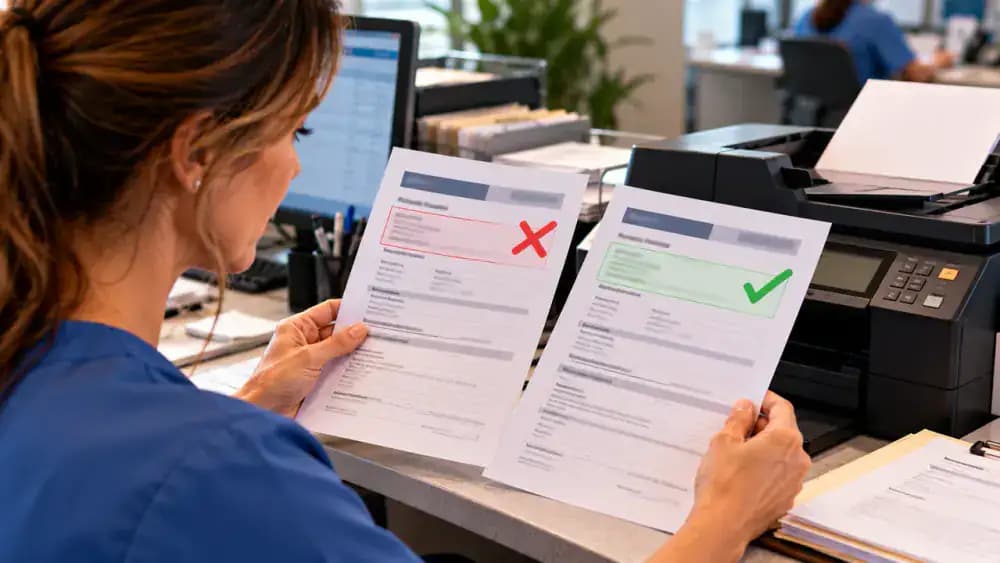
Confirm the Resent Referral Arrived at the Specialist's Office
After the referring office resends the paperwork, contact the specialist's intake or scheduling department again. Give the updated transmission date and reference number, then ask whether the referral is visible in their system and whether all required documents are present. As the sample tracker shows, receipt and completeness are separate statuses. Record the confirmed receipt date, any missing forms, and the office responsible for the next action.

Clarify Who Must Provide Missing Referral Documents
When the specialist identifies a missing form, ask for its exact name, which office must supply it, and the approved submission method. The sample action register organizes these details alongside an expected update and receipt status. Contact the responsible office to confirm the next action and timeline. Keep the document marked outstanding in your tracker until the specialist's office confirms it has arrived.

Verify Missing Paperwork Was Submitted and Received
When your follow-up date arrives, contact the responsible office and ask whether the missing form was sent, when it was submitted, and which approved channel was used. Record the response, then contact the specialist's intake department to confirm receipt and completeness. As the sample tracker shows, keep submission reported and receipt unconfirmed as separate statuses until the receiving office verifies the paperwork is complete.

Escalate Unresolved Referral Delays Through the Right Office
If the paperwork is complete but scheduling remains stalled, contact the specialist's scheduling team and ask what is still outstanding. The sample responsibility chart separates conflicting office updates and identifies who must investigate the delay. Request a specific next action, the responsible department, and an expected update window. If answers conflict, ask for a referral coordinator or office supervisor, then record the response and next follow-up date.

Review Your Referral Tracker and Identify Remaining Tasks
Review every section of your tracker, including both office contacts, referral dates, receipt confirmation, insurance requirements, and scheduling status. The sample spreadsheet keeps verified progress separate from unresolved tasks. Mark an item complete only after confirming it with the responsible office or insurer. For each pending item, record who must act next and when you will follow up, so you have a clear plan for addressing remaining delays.

Secure Your Referral Records and Keep Documents Organized
Keep referral notices, office confirmations, insurance reference numbers, and relevant correspondence together in one secure location. The example shows paper records sorted into labeled sections and digital copies organized in a protected folder. Remove unnecessary duplicates while retaining records you may need for future follow-up. Secure paper files in a private location, protect digital accounts, and never share personal health information through public or unverified channels.

Keep Your Follow-Up Dates and Referral Status Updated
Whenever an office provides new information, update your tracker and adjust reminders to match the revised timeline. The example shows a caregiver changing a follow-up date, recording a new reference number, and checking appointment status separately. Review pending tasks regularly so they remain visible. If the office has not confirmed a booking, leave appointment status pending even when other referral steps are complete.

Know When to Contact a Medical Professional About Delays
Your referral tracker can help you follow paperwork, but it cannot tell you whether waiting for an appointment is medically appropriate. The example shows a patient sharing a pending referral summary with a qualified clinician to discuss the delay. If you have questions about symptoms, worsening concerns, or care urgency, contact your referring clinician or another qualified medical professional. For a medical emergency in the United States, call 911.

Your Referral Tracking Plan - Know the Next Step
Keep your office contacts, referral status, insurance requirements, confirmation numbers, and follow-up dates together in one secure tracker. The sample summary shows how to separate verified information from tasks still marked pending. Before closing your record, check that every outstanding item has a responsible contact and next action. Save the checklist for future referrals, and update it whenever an office provides new information.

Your doctor says the referral was sent, but days go by without a call from the specialist. You check your phone, refresh your patient portal, and wonder whether you should keep waiting or start making calls. The frustrating part is that a referral being sent does not necessarily mean it has been received, that insurance requirements have been addressed, or that the specialist can schedule your appointment. Each step may involve a different office, and it is easy to lose track of who needs to do what next.
A simple referral tracking checklist can help you find out where things stand and follow up without starting from scratch every time you call. You will learn how to confirm that the referral arrived, check network and prior authorization requirements, identify missing paperwork, and record the next action and follow-up date. Keep your insurance information and referral details handy, use verified office contact information, and store personal health information securely. Insurance coverage and approval are not guaranteed, so confirm requirements directly with your plan. If you have questions about your symptoms or how urgently you need care, contact a qualified medical professional. For an emergency, seek immediate medical assistance.
Where people go wrong
Assuming the Referral Was Received. A referral being sent does not mean it reached the specialist's office or contains everything needed for scheduling. Contact the receiving office to confirm receipt, check whether documents are missing, and record who will handle the next step.
Waiting for Insurance Approval Without Checking Requirements. Insurance rules can involve network restrictions, referral requirements, or prior authorization. Contact your insurer to clarify what applies, who must submit the paperwork, and whether a reference number is available. Never assume approval or coverage is guaranteed.
Calling Without Recording Names or Next Steps. Repeated calls become frustrating when you cannot remember who said what or when to follow up. Record each call's date, representative's name, reference number, outstanding tasks, and expected response window. Set a calendar reminder for the next check-in.
Sharing Personal Health Information Through Unverified Channels. Trying to resolve delays quickly can lead to sharing sensitive details with the wrong contact. Use verified phone numbers and official patient portals, and store referral records securely. If symptoms worsen or you are unsure how urgently care is needed, contact a qualified medical professional. Seek immediate medical assistance for emergencies.
Questions people ask
Call your referring provider's office and ask when the referral was sent, which specialist received it, and whether supporting documents were included. Then contact the specialist's office using a verified phone number to confirm receipt. Record the date, representative's name, and any missing paperwork or next steps.
Fixed it?
Get one guide like this every Thursday.